The New Way To Access Caesar

Your new digital QR code is now required for facility access, resort benefits and more
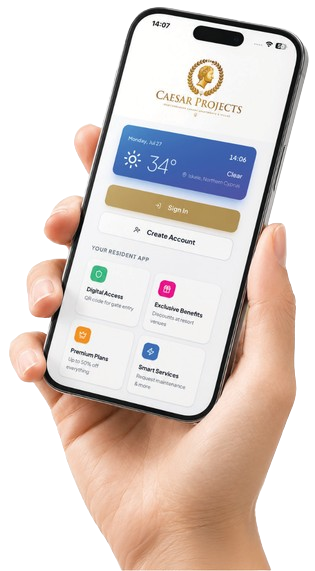
Download the new app
Register your account
Show your QR code at resort facilities
iOS & Android
2 Min Setup
Free for Residents
See It In Action

Watch How Caesar Living Works

A two-minute walkthrough of registration, digital access, and everything the app can do for you.

APP FEATURES

What you can do in the app?

Manage your property, payments and access in one place.

Property & profile

View all your properties in one account, update your personal details and register family members.

Payments & balance

View your balance and use it to pay maintenance fees, subscriptions and other available services.

Extra residents

Purchase access for up to 3 extra residents, buy an additional barcode for each person and pay directly from your app balance.

Top up your balance

Make a payment at the Rental Office, where maintenance fees are paid. The balance will appear automatically in your account.

Tenant management

For both short-term and long-term tenants, the property owner must send an invitation through the app. The tenant can register after accepting the owner's invitation.

Events & promotions

View upcoming events, community activities, available promotions, special offers and important announcements.

Important
When an apartment is rented out, the owner's access barcode is deactivated for the rental period and access is assigned to the registered tenant.
Client Guide

Registration & Activation

A quick guide to logging in, registering and managing yourproperty services. Choose the option that applies to you.
Already have an account
New to Caesar
Renting my property
1
Log in
Use the same email address or phone number connected to your account in the previous CRM, or the one on your Sales Agreement
2
Complete onboarding
Sign your property documents, add any other properties connected to you, and register family members.
1
Fill registration details
Enter your first and last name, phone number and email address, then upload a personal photo and your passport or national ID, along with your date of birth.
2
Verify contact details
Verify your phone number via WhatsApp and confirm your email address.
3
Submit for approval
Submit your application. Approval takes approximately 1–2 business days. You will receive an email confirming approval or advising what needs correcting.
4
Complete onboarding
Sign the Property Guidelines and Maintenance Agreement, complete your personal information, add any other properties connected to you, and register family members.
Your phone number and email must match those on your Sales Agreement. WhatsApp verification is not available for numbers starting +98, +53, +850 or +963 — contact the Membership Office if this affects you.
If your tenant already has a Caesar Living account they register the same way you did. If they do not, they cannot register on their own — you must invite them.
1
Invite your tenant
Log in to the Caesar Living App and send the registration invitation from inside the app.
2
Tenant accepts
Once the invitation is accepted and approved, the tenant completes onboarding and can start using the app.
For the duration of the tenancy your QR access is deactivated and all active QR access transfers to the registered tenant.
Download Full Guide (PDF)
Need help?
Contact the Membership Office: +90 539 117 79 45
Take It With You

Install Caesar Living App

Scan the code or open the link on your phone, then tap 'Install' when prompted
app.caesarliving.com
Install Caesar Living App
Tap to install for offline access
Install
That's what you'll see

Join the Caesar Membership today and unlock exclusive perks at all our locations.

Need to Know

Frequently Asked Questions

Still stuck?
The Membership Office can help with anything this page does not cover.
+90 539 117 79 45
Getting started
5
How do I access the app?
+

Open the official app link and add it to your phone’s home screen. You do not need to download it from an app store.

 I had an account in the old app. How do I access the new app?
+

Open the new app and enter the same phone number or email address connected to your previous account. You will receive a one-time verification code by WhatsApp or email. After verification, follow the instructions to complete or update your profile.

Do I need a password to log in?
+

No. You will receive a one-time verification code by WhatsApp or email each time you log in.

 I am a new owner. How do I register?
+

Select Create Account, complete all the required information, verify your phone number and email address, and submit your registration for approval.

How long does account approval take?
+

Account approval may take up to 48 hours. You will receive a notification when your account is approved or if additional information is required.

Access, QR and tenants
3
How can a tenant register?
+

Tenants must receive an invitation from the property owner or the Caesar Rental Office. After receiving the invitation, the tenant must complete and submit the registration form.

What happens to my access if I rent out my property?
+

When a tenant is registered for your property, the tenant receives access for the rental period, and the owner’s QR access for that property is temporarily deactivated. It will be restored when the tenancy ends.

Why is my QR code not working?
+

Access may be restricted because of a missing profile photo or identity document, unsigned required documents, an outstanding balance, or an inactive registration. Check your account to see what action is required.

Account, billing and support
4
Can I register more than one property under my account?
+

Yes. You can add and manage all your Caesar properties under one account.

I cannot log in or receive the verification code. What should I do?
+

Check that you entered the same phone number or email address used for your previous account. Make sure the country code is correct, WhatsApp is active, and check your email’s spam folder. You can also try the other verification method. If the problem continues, contact the Membership Office +905391177945

Where can I top up my account balance?
+

You can top up your balance at the Rental Office, where maintenance fees are paid. Once the payment is completed, the updated balance will automatically appear in your account.

Who do I contact if I experience an issue?
+

Please contact the Caesar Membership Office +905391177945 and provide your full name, project name and apartment number.

Secure Access
Your QR code is unique to you
Exclusive Benefits
Discounts at resort venues
Smart & Simple
Everything in one app
24/7 Support
Membership Office on call
Company Name
Afik Rentals LTD
TAX Number
008020618 / MŞ21287
ZIP Code
99850
Address
TRNC, Mackenzieavenue Cevizli, Ezgi Street, Caesar Resort, Mersin 10
© 2026 POWERED BY CAESAR PROJECTS